Optimization
Your Checklist for the Ecommerce Checkout Flow That Converts
Master the art of the Shopify ecommerce checkout flow to create a seamless process from cart to confirmation.
Compare the 10 best Shopify checkout upsell apps for 2026 by placement, Shopify Plus fit, pricing, and testing, from in-checkout offers to thank you pages
Grocery stores figured out checkout upsells decades ago.
Gum. Batteries. The chocolate treat you didn't plan on buying but absolutely earned that day (and everyday if I'm being honest).
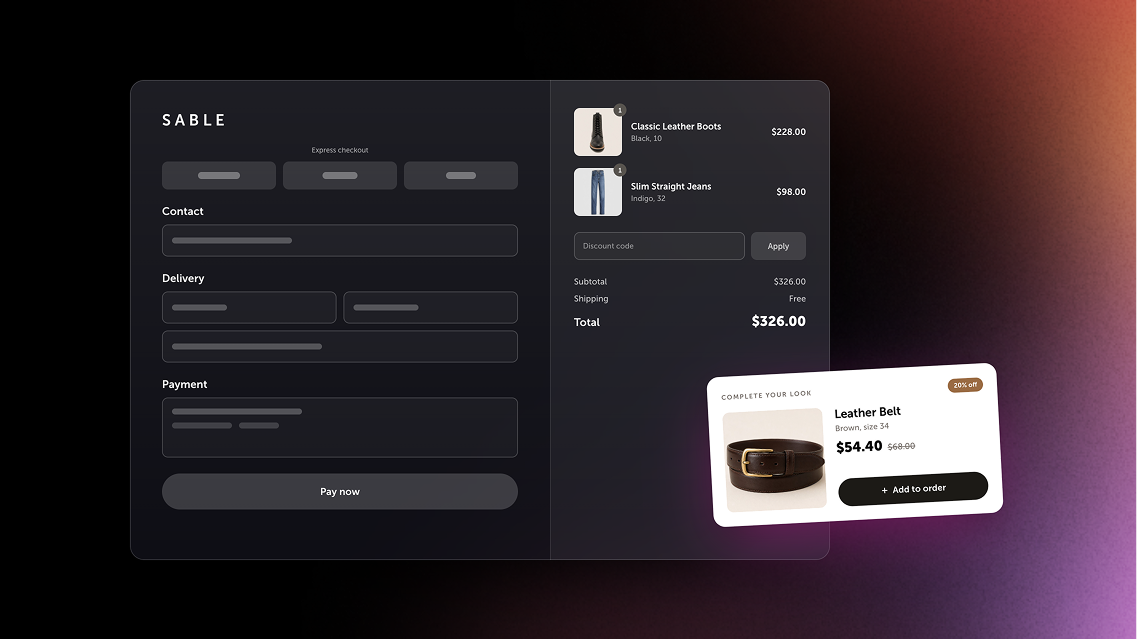
Shopify brands get the same moment, with much better aim. The shopper has picked their products, typed in their address, and is one click from done. A relevant offer at that point feels helpful. And once they've paid, a one-click post-purchase offer can add to the order without asking for their card again.
The hard part is picking the app. Shopify rebuilt its checkout over the last few years, some placements only work on Shopify Plus, and pricing runs from flat monthly fees to a cut of every upsell you sell.
So we compared the 10 best Shopify checkout upsell apps on what matters once offers go live: where offers can appear, Shopify Plus requirements, personalization, testing, pricing, and how well each app fits Shopify's native checkout.
Quick disclosure: Rebuy Checkout Extensions and Rebuy Post-Purchase Offers (our Checkout & Post-Purchase package) compete with most of these apps. You'll find Rebuy at number one (shocking, we know). So read our list with that in mind. We've tried to give every app a fair shake, cons included. Ours too.
Prices and features come from each app's Shopify App Store listing or pricing page in October 2026. They change, so check before you install.
A checkout upsell is an offer a shopper sees during or right after checkout. It might be a bigger size, an add-on, a subscription, or a product that pairs with what's already in the order. (Our upsell glossary entry has the longer definition.)
Three terms show up a lot:
You'll also see "order bump," which usually means a small, low-cost add-on (shipping protection, a sample, gift wrap) placed right next to the order summary.
"Checkout upsell" covers four different moments. Each one has its own rules, and Shopify sets most of them.
Here are the nine criteria we used to rank these apps, and the ones we'd use to judge any checkout upsell app.
Checkout is where card numbers get typed, so a few extra minutes here are worth it.
Plenty of apps on this list reach more than one checkout moment. What sets Rebuy apart is that one AI and rules engine runs all of them, from the first checkout step to the order status page. It’s the same engine behind the Rebuy Smart Cart and merchandising widgets.
You get two main tools, plus a free bonus.
Rebuy Checkout Extensions add personalized upsell and cross-sell offers and content blocks inside Shopify checkout. Offers can trigger on customer behavior, product data, cart value, and more. Content blocks add testimonials and trust badges right where shoppers hesitate. It's all built on Shopify's native checkout extensions, which Shopify limits to Shopify Plus stores.
Rebuy Post-Purchase Offers show one-click offers between checkout and the thank you page, on Plus and standard plans. Shoppers add products without re-entering payment details. Build multi-step flows: if a shopper accepts, offer more. If they decline, show something different.
Rebuy Monetize is the bonus. It's free, it shows shoppers offers from big brands on your thank you and order status pages, and it pays you when shoppers click or convert.
Key features:
Rebuy Checkout Extensions results:
Rebuy Post-Purchase Offers results:
Rebuy Monetize results:
Pricing: Checkout & Post-Purchase starts at $25/month for one package, priced by your monthly Shopify orders. Bundle packages to save 10% on two, 20% on three, or 30% on all four. Rebuy Monetize is free. Every package starts with a 14-day free trial and a money-back guarantee. See Rebuy pricing.
Pros:
Cons:
Aftersell, now owned by Rokt, built its name on one-click post-purchase upsells. Its Smart Funnels test thousands of offer combinations (more than 6,000, by Aftersell's count), and targeting goes deep: product, cart value, tags, UTM, and more.
Key features:
Pricing: Post-Purchase is $34.99/month for up to 200 monthly orders and scales with order volume to a cap of $999.99/month. Pre-Purchase starts at $59.99/month. Complete (both plans, plus a product recommendation engine) starts at $79.99/month for 500 orders. All three include a 30-day free trial. Rokt Thanks is free, and Aftersell says it pays $0.30 to $0.80 per order.
Pros: Deep post-purchase testing, checkout upsells for Plus without a pricier plan, and a free thank you page offer network.
Cons: Product recommendations need the Complete plan, and order-based pricing climbs with volume even when upsells don't.
Zipify OneClickUpsell (OCU) charges by the upsell revenue it brings in, not by your order count. Small stores start low, and the bill grows only when upsells grow.
Key features:
Pricing: Free on development and partner stores. Starter is $9.95/month for up to $200 in monthly upsell revenue. Between $200 and $2,500, pricing starts at $25/month and steps up as revenue grows. Past $2,500, it starts at $149/month and caps at $999/month. Every plan includes a 30-day free trial.
Pros: Low entry price, no charge for order volume, and one-click funnels with cart and checkout coverage.
Cons: Your bill climbs as upsells succeed, and checkout upsells need Plus.
ReConvert rebranded as Upsell.com, but the app still goes by ReConvert in the Shopify App Store. It covers almost every surface on this list, and its drag-and-drop editor makes thank you page customization easy.
Key features:
Pricing: Free up to 50 orders or $50 in upsell revenue. Growth plans are $9.99/month (51 to 100), $19.99/month (101 to 200), and $39.99/month (201 to 500), based on store orders or upsell revenue, whichever is higher. Every plan includes every feature, and paid plans come with a 14-day free trial.
Pros: A real free plan, every feature on every plan, and wide surface coverage.
Cons: Pricing counts orders or upsell revenue, whichever is higher, and checkout upsells need Plus.
UpsellPlus is the rare upsell app that follows shoppers into your physical store. Alongside cart, checkout, and post-purchase offers, it adds one-tap upsells and automatic discounts in Shopify POS.
Key features:
Pricing: Free to build, with a 14-day free trial to launch. Launch is $49/month for up to $500 in app-generated revenue. The Shopify Plus plan is $119/month for up to $2,000 in upsell revenue and adds checkout upsells and AI recommendations. Scale is $199/month for up to $5,000. Annual billing saves 15% to 20%.
Pros: POS coverage, broad subscription app support, and multivariate testing.
Cons: Revenue caps on every paid plan, and checkout upsells start on the $119 plan.
Wiz, from Skai Lama, is a checkout customization toolkit with upsells built in. Offers sit next to trust badges, banners, custom fields, gift messages, and shipping and payment rules.
Key features:
Pricing: Essential is $49/month for post-purchase, thank you, and order status upsells, for stores not on Shopify Plus. Plus Growth is $99/month ($999/year) and adds checkout upsells. Checkout Concierge is $199/month ($1,999/year). Every plan includes a 14-day free trial.
Pros: Deep checkout customization, a plan for after-checkout offers on standard Shopify, and a done-for-you option.
Cons: No cart upsells and no free plan.
CartHook lets you start with no monthly fee. You pay per order plus a small cut of upsells, then move to a flat plan once your volume makes it worth it.
Key features:
Pricing: Pay as you go is free to install, with 20 free orders a month, then $0.12 per order plus 1% of upsell revenue. Growth is $49/month with 1,000 orders included, then $0.14 per order, capped at $1,200. Scale is $149/month. Paid plans include a 14-day free trial and no revenue share.
Pros: No upfront cost, rich offer pages, and no revenue share on paid plans.
Cons: Per-order fees add up at volume, and there are no cart upsells.
Honeycomb, from Conversion Bear, includes A/B split tests on every plan, including the free one. Funnels run on product pages, the cart, checkout, the post-purchase page, and the thank you page.
Key features:
Pricing: Free for 100 funnel views a month. Silver is $54.99/month for 2,000 views, Gold is $109.99/month for 5,000, and Platinum is $169.99/month for 10,000. Paid plans include a seven-day free trial.
Pros: Split testing everywhere, full funnel coverage, and order merging after checkout.
Cons: Pricing by funnel views means a traffic spike like BFCM can push you up a tier, and the in-checkout funnel needs Plus.
Candy Rack, from Digismoothie, places offers in eight spots, from the product page to post-purchase, and charges by order count with unlimited upsell revenue. It ships with its own cart drawer, too. Like every app here, its in-checkout placement depends on Shopify Plus.
Key features:
Pricing: Free for trial and development stores. Lite is $29.99/month (up to 50 orders), Starter is $39.99/month (51 to 200), and Growth is $59.99/month (201 to 500). Every paid plan includes unlimited upsell revenue, an eight-day free trial, and a 60-day money-back guarantee.
Pros: No revenue caps, a cart drawer included, and plenty of offer types.
Cons: Testing depends on a separate app (Intelligems), and the listed plans stop at 500 orders a month.
OrderBump keeps pricing simple: one plan for standard Shopify stores and one for Shopify Plus. Triggers are easy to set up, too, built on product tags, SKUs, and cart value.
Key features:
Pricing: Standard Shopify is $39/month for post-purchase upsells and analytics. Shopify Plus is $139/month and adds in-checkout upsells. Both include a 14-day free trial.
Pros: Easy-to-read pricing with no usage limits listed, plus cart and post-purchase coverage.
Cons: Fewer integrations than most apps here, and no thank you page upsells listed.
| App | Free trial or plan | Starting price | Pricing based on | In-checkout upsells (Shopify Plus) |
|---|---|---|---|---|
| Rebuy | 14-day free trial. Rebuy Monetize is free. | $25/month per package | Monthly orders | Included in Checkout & Post-Purchase |
| Aftersell | 30-day free trial | $34.99/month | Monthly orders, capped at $999.99/month | Included in Post-Purchase plan |
| Zipify OneClickUpsell | 30-day free trial. Free on development stores. | $9.95/month | Upsell revenue, capped at $999/month | Yes |
| Upsell.com (ReConvert) | Free up to 50 orders | $9.99/month | Orders or upsell revenue, whichever is higher | Every plan |
| UpsellPlus | Free to build. 14-day free trial. | $49/month | Upsell revenue, capped per plan | Shopify Plus plan, $119/month |
| Wiz: Checkout Upsell | 14-day free trial | $49/month | Flat monthly fee | Plus Growth plan, $99/month |
| CartHook | Free to install. 20 free orders a month, then $0.12 per order plus 1% of upsell revenue. | $49/month for flat plans | Orders | Growth plan and up |
| Honeycomb | Free for 100 funnel views a month | $54.99/month | Funnel views | Yes |
| Candy Rack | Free on development stores | $29.99/month | Monthly orders, unlimited upsell revenue | Yes |
| OrderBump | 14-day free trial | $39/month | Flat monthly fee (two plans) | Shopify Plus plan, $139/month |
All of them, for part of the journey. Shopify restricts in-checkout offers (the information, shipping, and payment steps) to Shopify Plus. The other surfaces are open to standard plans.
If you've been on Shopify a while, you remember editing checkout.liquid and pasting scripts into "additional scripts." That era is over.
The replacement is Checkout Extensibility: checkout UI extensions, post-purchase extensions, Shopify Functions for discounts and rules, and web pixels for tracking. For upsell apps, that means offers built as native extensions. They load fast, Shopify keeps them away from payment details, and they're upgrade-safe when Shopify updates checkout.
If an app still asks you to paste code into your checkout in 2026, take that as a sign to keep shopping.
Run each model against your biggest month. A plan that looks cheap in March can look very different the week of Black Friday.
Keep post-purchase offers priced well below the original order. A small, relevant add-on is an easier yes than a second full-price purchase.
Test one variable at a time (product, discount, or copy), and give each test enough orders to call a winner.
Not every thank you page offer has to be your own product. Monetization apps show shoppers offers from other brands after purchase and pay you when shoppers engage.
Check category rules before you sign up. Some networks don't serve stores that sell alcohol, CBD, or adult products, and availability varies by country.
The best checkout upsell app fits your Shopify plan, your order volume, and the moments you want to own. Start with your plan, then match the app to your stage of growth.
New stores: Start free or cheap, with one post-purchase offer on your bestseller. Upsell.com, CartHook, and Zipify OCU keep early costs low.
Growing brands: Add testing, downsells, and subscription offers. This is where pricing models start to matter, so compare order-based and revenue-based plans at next year's volume.
Shopify Plus and enterprise brands: Prioritize personalization across every surface, native checkout extensions, testing, and real support. Your checkout offers should connect to your cart and post-purchase flows instead of living in three separate apps.
Check three details: which plan includes checkout upsells, how the app handles your subscription app and discount codes, and whether it's built on Shopify's native checkout extensions.
It depends on your Shopify plan and where you want offers. Rebuy is best for personalized offers from checkout to the order status page, Aftersell for post-purchase funnels with heavy testing, Zipify OneClickUpsell for pricing tied to upsell revenue, Upsell.com for a free plan, and Wiz for full checkout customization on Shopify Plus.
For offers inside checkout, yes. Shopify limits checkout UI extensions on the information, shipping, and payment steps to Shopify Plus stores. Post-purchase offers and thank you and order status page upsells work on standard plans. (Thank you and order status page extensions work on every plan except Shopify Starter.)
A checkout upsell appears inside checkout, before the shopper pays, and needs Shopify Plus. A post-purchase upsell appears after payment, on a page before the thank you page. The shopper accepts with one click, and the item joins the same order.
A one-click upsell is a post-purchase offer that adds a product to the order without re-entering payment details. It works when the shopper pays by credit card or Shop Pay. Shopify doesn't show post-purchase offers for wallets like Apple Pay and Google Pay, installment services like Klarna and Afterpay, PayPal's express checkout, gift cards, or orders in a currency other than the store's default.
Yes. Thank you and order status page extensions work on every Shopify plan except Starter. Because the order is already final, an accepted offer opens a new checkout. You can also earn money on that page by showing other brands' offers with a free app like Rebuy Monetize.
Most paid plans start between $10 and $55 a month. In-checkout upsells for Shopify Plus often cost more, from $99 to $139 a month on Wiz, UpsellPlus, and OrderBump. Order-based and revenue-based plans climb as you grow, so check the cap.
Not easily. Shopify's free Checkout Blocks app adds content blocks to the thank you and order status pages (and to checkout on Shopify Plus), but its App Store listing doesn't describe product upsell blocks. Shopify Plus stores can build a custom checkout UI extension, which takes developer time. For most brands, a checkout upsell app is the faster route.
They can be, with a little care. Choose apps built on Shopify's checkout UI extensions, which run in an isolated sandbox without access to payment details. Turn on two-factor authentication for every account, skip custom code you don't need, and run a test checkout in a private window after every app install or update.
The best checkout upsell app fits the way your shoppers buy. Know which surfaces your Shopify plan opens up, pick offers that feel like help, and run the pricing math against your busiest month.
Nobody walks into a grocery store for the gum.
They leave with it anyway.
And if you want offers that personalize themselves from checkout to the order status page, we'd love to show you around. Book a Rebuy demo →
Master the art of the Shopify ecommerce checkout flow to create a seamless process from cart to confirmation.
Prepare for BFCM sales with frictionless commerce! Optimize your Shopify Plus checkout now for a smooth shopping experience and holiday profits.
Customize your Shopify Plus checkout page with Rebuy to boost AOV and drive sales using personalized upsells and cross-sell offers.
Stay up to date with all things Rebuy by signing up for our newsletter.